How to Check a Laser Level's Accuracy and Calibrate It
To calibrate a laser level, check its accuracy against a stable reference first. Most self-leveling models don't offer user adjustment, so use the manual's calibration procedure or contact the maker if the check fails.
On this page (7 sections)
To calibrate a laser level, check its accuracy against a stable reference first. Most self-leveling models don't offer user adjustment, so follow the manual's calibration procedure or contact the maker if the check fails.
A laser level may still switch on and project a clear line after a drop or rough trip. Checking it before hanging cabinets, setting tile, or laying out a floor can help you catch a measurement error before it spreads across the job.
How do you check a laser level's accuracy?
Compare the laser line with repeat marks from the same setup. Use a stable surface, avoid moving the tool, and check the tolerance in its manual.
For a basic horizontal check:
- Set the tool on a firm surface facing a wall, and let it settle according to its instructions.
- Mark the line on the wall and label the mark.
- Rotate the tool 180 degrees without changing its height, then let it settle again.
- Compare the new line with the first mark.
A gap between the marks can indicate an accuracy problem, but this simple check is only a screening step. The tool's manual should give the proper test distance, setup, and allowable error for that model.
For a more useful result, repeat the check at the distance recommended in the manual. Keep the tool at the same height and make sure its mount, tripod, and floor are stable.
Our guide to laser level accuracy over long distances explains why small errors can become more noticeable as the distance grows. A line that looks close on a nearby wall may still miss the tool's tolerance farther away.
How do you check a laser level's vertical line?
Compare the projected vertical line with a plumb reference. A weighted string can provide a simple reference, as long as it hangs freely and has stopped moving.
Place the tool far enough from the wall to see both the projected line and string. Check whether the laser follows the string from top to bottom, then repeat the setup if air movement or a bump could have shifted either one.
A string test can reveal a mismatch, but it doesn't replace the manufacturer's calibration procedure. Use the manual's instructions when deciding whether the result is within tolerance.
What can affect a calibration check?
A shaky setup, movement, or an unsettled pendulum can make a good tool appear inaccurate. Check the setup before concluding that the laser needs service.
Set the tool on a firm, level surface or a secure mount. Keep it away from vibration, moving equipment, and surfaces that could shift as you work.
If the model has a locking pendulum, use the mode required for the test. For self-leveling, open it and wait for the tool to settle; a flashing line can signal that the unit is outside its leveling range, depending on the model.
Bright light can make a line difficult to see, while reflective surfaces can produce confusing extra lines. Use a clear, non-reflective wall and follow the tool's instructions for operating conditions.
Do you adjust a laser level yourself?
Only adjust a laser level if its manual gives a user calibration procedure. Internal screws and settings can affect accuracy, and an improvised adjustment may make the tool less reliable.
Some models provide a calibration mode or instructions for checking and correcting alignment. Others may require a qualified service center, so check the manual or contact the manufacturer before opening the housing.
Don't use a single wall mark to turn an adjustment screw until the line appears right. The check needs a repeatable reference and the model's stated tolerance.
Does self-leveling mean the laser is calibrated?
No, self-leveling and calibration describe different things. Self-leveling helps a tool project a level line when it is within its operating range; calibration checks whether that line is accurate.
The Klein Tools 93CPLG has three green 360-degree laser planes and a tilt mode that locks its pendulum for angled layouts. Use the mode and accuracy-check procedure described in its manual for the task.
A self-leveling feature doesn't eliminate the need to check accuracy after a hard knock or when results don't match a trusted reference. See the laser level buying guide to compare line types and features before choosing a tool.
What should you do if the laser level fails the check?
Repeat the check once with a stable setup, then stop using the tool for precision work if the mismatch remains. Compare the result with the tolerance and service steps in the manual.
Check that the surface, mount, and tool haven't shifted between readings. Also confirm that you used the right mode and allowed the line to settle.
If the mismatch persists, contact the manufacturer or an authorized service provider. Don't assume a visible line is accurate just because it looks straight.
A line laser such as the DeWalt DW088K projects crossing horizontal and vertical red lines. DeWalt states an accuracy of about 1/8 in at 30 ft, which gives you a model-specific reference point when reading its instructions.
For layout work, a small accuracy error can carry through the whole project. Use a laser level to hang a straight picture wall only after checking that your reference line is trustworthy.
How often should you check a laser level?
Check it before important precision work and after a hard impact or rough transport. Follow the manual for any routine inspection or calibration interval.
You may also want to check it if a line no longer agrees with a known reference, repeated measurements differ, or a job comes out unexpectedly out of level. Store and carry the tool as its instructions recommend.
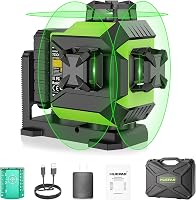
A Huepar 3x360 projects one horizontal and two vertical 360-degree lines. Huepar gives an accuracy of ±1/9 in at 33 ft for this model, so use its manual for the correct check method and tolerance.
Before checking and leveling a floor with a laser level, compare the tool with a stable reference and confirm that the floor readings make sense across the room.
What is the safest way to calibrate a laser level?
Use the maker's procedure and avoid opening or adjusting the tool without instructions. Stop using it for precision work if it fails a repeatable accuracy check.
Keep the laser pointed away from people's eyes and follow the safety directions for your model. When the check passes, use the tool for layout; when it fails, arrange service or calibration before relying on it.
For a laser level calibration check, the decision is simple: trust repeatable readings within the model's stated tolerance. If the result is outside that range, follow the manual or seek service, then return to the laser level buying guide if you need a replacement.
Frequently asked questions
Do laser levels need to be calibrated?
Laser levels need an accuracy check after a hard drop, rough transport, or a result that looks wrong, and at the intervals in the manual. Whether calibration is needed depends on the tool and its use; a self-leveling mechanism doesn't prove the projected line is accurate.
Can I calibrate a laser level at home?
You can check a laser level at home with a stable surface, a wall, and repeat measurements, but adjustment depends on the model. Many tools require service or a maker's procedure, so don't turn internal screws unless the manual specifically allows it.
How do I know if my laser level is out of calibration?
Repeat a level or plumb check from different positions and compare the marks. If the line shifts beyond the tolerance in the manual, or repeated checks disagree, stop using it for precision layout and follow the maker's calibration or service instructions.
Does a self-leveling laser need calibration?
A self-leveling laser can still need an accuracy check. Self-leveling helps the tool establish a level line within its operating range, but it doesn't confirm that the line matches a trusted reference or that the tool stayed accurate after an impact.
Frequently asked questions
Do laser levels need to be calibrated?
Laser levels need an accuracy check after a hard drop, rough transport, or a result that looks wrong, and at the intervals in the manual. Whether calibration is needed depends on the tool and its use; a self-leveling mechanism doesn't prove the projected line is accurate.
Can I calibrate a laser level at home?
You can check a laser level at home with a stable surface, a wall, and repeat measurements, but adjustment depends on the model. Many tools require service or a maker's procedure, so don't turn internal screws unless the manual specifically allows it.
How do I know if my laser level is out of calibration?
Repeat a level or plumb check from different positions and compare the marks. If the line shifts beyond the tolerance in the manual, or repeated checks disagree, stop using it for precision layout and follow the maker's calibration or service instructions.
Does a self-leveling laser need calibration?
A self-leveling laser can still need an accuracy check. Self-leveling helps the tool establish a level line within its operating range, but it doesn't confirm that the line matches a trusted reference or that the tool stayed accurate after an impact.